Documentation just became someone else's job.
That someone is the agent you already talk to: say what to write and drafts land in your dashboard, ready to publish on your own domain. The site answers your customers, and your agent drafts what they could not find.
Seven days, full access, no card. Your site stays online for fourteen days after, whatever you decide.
docs.acme.com/getting-started/install-the-cli
Docs / Getting started
Install the CLI
Updated 28 Jul 2026
The CLI is how you deploy from your own machine.
Tip
Node 18 or newer. Check with node -v.
1. Install
$ npm install -g @acme/cli
2. Authenticate
Run acme login and paste the key from Settings, then API keys.
- Knowledge bases
- Help centers
- SOPs
- User manuals
- Internal handbooks
One product. Each is a live site, not a folder of files.
Documentation running on Dewstack at




- and 1,000+ more teams
You are not going to sit down and write eighty pages.
Nobody is. So the first draft has to come from somewhere other than you.
Showing: It is in your chat right now
You are not going to sit down and write eighty pages.
Nobody is. So the first draft has to come from somewhere other than you. Five places it already lives:
Great, that's the version we'll keep. Add it to my docs.
Done. It is in your Billing collection as a draft.
Refund policy Draft
It is in your chat right now
You already draft with the AI you talk to. Once your docs are connected, that conversation ends with "add this to my docs," and a formatted draft lands in your dashboard.
- Welcome and first week
- Accounts and tools setup
- Payroll and leave policy
- Security basics
It is sitting in a document
The process guide in Word, the onboarding PDF, the exported wiki: upload it and it becomes organised pages on a live site, images extracted and placed.

It exists, just scattered everywhere
The answers already live in Notion, Confluence, Google Docs, GitHub, old PDFs. Point Dewstack at them; they arrive formatted and organised. Over twenty sources.
- Click "Login"app.acme.com
- Enter usernameapp.acme.com/auth
- Screenshot capturedWriting the step
Login_procedure.md
DraftHow to log in
- 1.Go to app.acme.com
- 2.Click the Login button
2 screenshots placed
Only one person knows how, and it is you
Do the task once with FlowCapture recording. Every step becomes a screenshot and a written procedure, structured and editable.
What are you documenting?
Onboarding and support docs for a payroll app.
- Getting started4 pagesCreate your first pay run
- Running payroll6 pagesApprove timesheets
- Troubleshooting5 pagesA payment was rejected
yourcompany.dewstack.com
LiveThere is genuinely nothing yet
Describe what you are documenting and Dewstack builds and publishes the pages. Or open a written template: not a file, a running site you edit.
All five end in the same place, behind one approval
Wherever the draft began, it lands in one dashboard. Agents connect with one approval: paste one address, log in, press Allow.
- You approve once, on your own login screen
- Everything an agent writes arrives as a draft
- Revoke any time; every replaced page keeps its history
Claude connects today, and so does ChatGPT in developer mode; Claude Code and Cursor write through the same door with a key. Built on MCP and OAuth, so the next agent your team adopts is already connected.
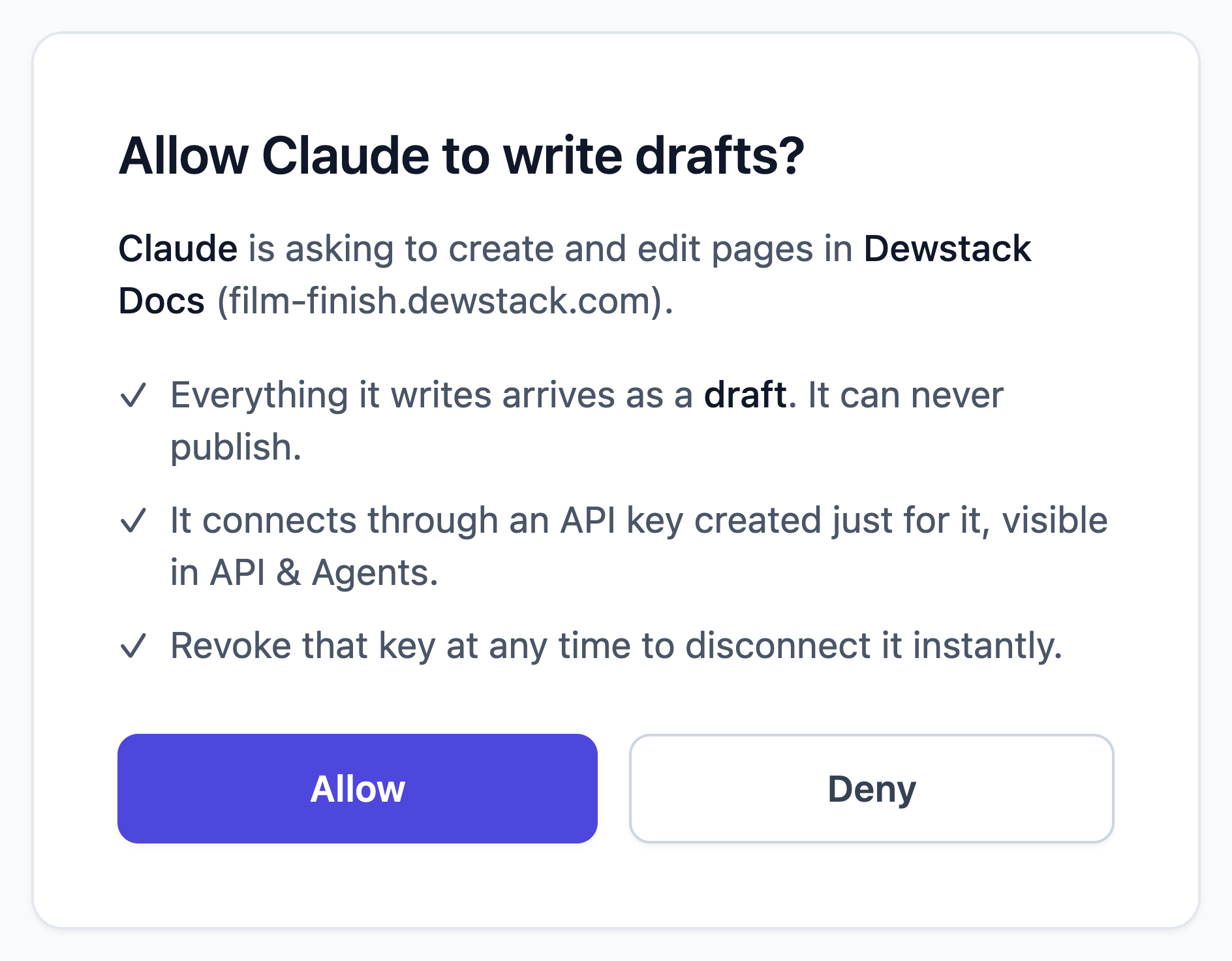
The approval screen, exactly as it ships.
And whichever origin it came from, AI Page Assist rewrites, restructures and translates it in place.
Live on your own domain before the end of the day.
What you publish is a site, not a folder: your brand, your domain, free SSL, no engineer.
- Yours, visibly
- Custom domain, free SSL, your brand, a landing page builder.
- Private where it should be
- Password protection and per-collection access control.
- Safe to hand around
- Version history with rollback, and four roles.
- Findable when it matters
- AI-ranked search that forgives typos.
And your customers are not the only ones reading.
More people will ask an AI about your product this year than will open your docs site. Publish once and the answer comes from you, in the form each reader needs.
Showing the page as Your customer
And your customers are not the only ones reading.
More people will ask an AI about your product this year than will open your docs site. Publish once and the answer comes from you, in the form each reader needs.
docs.acme.com/getting-started/install-the-cli
Docs / Getting started
Install the CLI
Updated 28 Jul 2026
The CLI is how you deploy from your own machine.
Tip
Node 18 or newer. Check with node -v.
1. Install
$ npm install -g @acme/cli
2. Authenticate
Run acme login and paste the key from Settings, then API keys.
They land on your site, not a subdomain of ours
Your colours, your logo, your domain, free SSL, and search that forgives typos. Nothing says they left your product.
docs.acme.com/getting-started/install-the-cli.md
---
title: Install the CLI
collection: getting-started
updated: 2026-07-28
---

# Install the CLI

The CLI is how you deploy from your own machine.

> [!TIP]
> Node 18 or newer. Check with `node -v`.

## 1. Install

```bash
npm install -g @acme/cli
```

## 2. Authenticate

Run `acme login` and paste the key from
Settings, then API keys.
/llms.txt · /llms-full.txt · robots.txt points at both
Models training and searching get clean source, not scraped HTML
Add .md to any article URL for the raw source. Your site publishes llms.txt and llms-full.txt, and points robots.txt at both.
docs.acme.com/mcp
Request
{
  "method": "tools/call",
  "params": {
    "name": "get_article",
    "arguments": {
      "collection_slug": "getting-started",
      "article_slug": "install-the-cli"
    }
  }
}
Result
{
  "title": "Install the CLI",
  "url": "https://docs.acme.com/getting-started/install-the-cli",
  "updated_at": "2026-07-28",
  "content": "# Install the CLI\n\nThe CLI is how you deploy from your own machine.\n\n## 1. Install\n\n```bash\nnpm install -g @acme/cli\n```\n..."
}
search · fetch · list_articles · get_article
A stuck customer asks their own AI, and it looks it up in your docs
Your docs host is an MCP server: their assistant searches your documentation and fetches the exact page, live.
Try it on us before you trust it with yours.
Dewstack's own endpoint, live right now: paste it into Claude or ChatGPT and ask about Dewstack.
https://docs.dewstack.com/mcpSupport tickets that answer themselves.
The point of the site is the question that never reaches you at eleven at night. SmartDocs answers it from your pages, cites its source, and hands off to a human when the pages run out.
It waits where the confusion happens
Someone stuck in your product will not go find your docs site. Paste one snippet and the answer waits inside your app, and in Slack for your team.
app.acme.com/settings/billing
Why was I charged twice this month?
A second charge appears when you add seats mid cycle. It is prorated for the days remaining, and your next invoice returns to the usual date and amount.
Billing / Prorated billing
Still stuck? Talk to the team
<script src="https://chat.dewstack.com/widgets/ask/widget.js"
        data-widget-id="A7Rk-pQ2v-Ndx4-Lm8T"
        data-position="bottom-right" async></script>
Your own snippet, with your widget id, is on the Embed tab in SmartDocs.
It answers from your pages, and says which one
It reads your documentation and nothing else, so it cannot improvise a policy you never wrote.
It cites the page, every time
Every answer names the article it came from.
It says when it does not know
No page, no answer: the question goes to your inbox.
It answers your team too
The same content answers in Slack.
And it keeps every question it could not answer.
It tells your agent what to write next.
Documentation dies six weeks in, when nobody knows which page is wrong. Dewstack keeps the receipts: every empty search, every unanswered question, every stale page.
Searches with no result, last 30 days
- refund after trial ends41
- sso okta setup33
- export to pdf28
- api rate limits19
Illustrative view of the search analytics dashboard.
An authoring tool never sees the reader. Dewstack owns the answers and the search box, so it knows where your docs stopped being useful.
One page, not eighty.
Forty one people searched for the refund policy and found nothing. That is not a documentation project; it is one page.
Ask your agent what the docs failed to answer: it reads the same list and drafts the missing pages. The draft waits with your name on the publish button, and the number on the list goes to zero.
Signals are read only through a connection you approved; everything written back waits as a draft.
- Write
- Publish
- Answer
- Learn
- Write
Every documentation tool sells the first two arrows. Dewstack owns all five, which is why the last one points back at the first: you cannot report what readers failed to find unless you were the one answering them.
Used by more than 1,000 teams.
Support leads, operations managers and technical writers, mostly at companies where nobody had the time to write any of this either.
"We migrated from Confluence in under a day. Our support tickets dropped 35% in the first month after deploying SmartDocs. Users actually find answers now instead of emailing us."
"FlowCapture changed how we onboard new hires. Instead of writing SOPs manually, we just record the workflow and the docs write themselves. Saved us weeks of effort."
"We needed customer-facing docs on our own domain with AI search, not another internal wiki. Dewstack was the only tool that nailed this without requiring engineering help."
"The SmartDocs chatbot handles 60% of our Tier 1 questions automatically. We embedded it in our app and our support team finally has bandwidth for complex issues."
Start free for seven days. No card.
Full access during the trial. If you subscribe and change your mind, there is a 30 day money back guarantee.
Can an agent overwrite my documentation?
Not without your explicit approval, and not onto your live site. Connecting an agent shows an approval screen on your own login, and only workspace Owners and Admins can approve it; manually created keys are read-only unless you choose write access at creation, a choice that cannot be widened afterwards. Pages an agent writes arrive as drafts and stay in your dashboard until a person publishes them. The markup is sanitized before it is stored, every write is recorded against the key that made it, and each key has a daily ceiling. When an agent updates a page, the previous version is saved to history first, so you can roll back. Revoking a key disconnects it immediately.
I have nothing written. What happens on day one?
You pick a template and it arrives as a live, populated site on your address. Every page is real, authored content, not an empty outline. You edit what does not apply rather than starting from a blank page.
What actually happens when the trial ends?
The trial is seven days with full access and no credit card, and nothing is charged automatically. If you do nothing, dashboard access closes at the end of day seven, but your published site stays online for a further fourteen days, so anything you pointed customers at does not go dark while you decide. After you subscribe there is a 30 day money back guarantee on the first bill.
If I leave, can I take my content with me?
Yes, and you do not have to ask us. Export the whole workspace as a single PDF with a table of contents, as a ZIP of HTML files organised by collection, or as a CSV of every page and its content. Separately, every published page already serves as plain markdown by adding .md to its URL, and llms-full.txt is the entire corpus in one file. There is no format here that only we can read.
How is this different from Notion or Confluence?
Those are internal wikis you can share. Dewstack is a customer-facing docs product: your own domain, an AI that answers from your content with citations, analytics on what readers could not find, and a machine-readable surface for agents. We keep honest side-by-side comparisons for nine tools.
Do I need a developer to set this up?
No. Publishing, branding and connecting a custom domain with SSL are done in the dashboard. The MCP endpoint, llms.txt and the markdown alternates are switched on by publishing, not by configuration.
Can an AI write my documentation for me?
It can draft from what you give it, never from nothing. You already draft with Claude, ChatGPT or Gemini; connect your docs, and that conversation can end with "add this to my docs", the pages arriving as drafts in your dashboard for you to review and publish. Claude connects this way today, ChatGPT does too in developer mode, and the door is an open standard the rest are adopting. And inside Dewstack, upload a document, record a task, or describe what you are documenting, then let AI Page Assist rewrite, restructure and translate what is there. What does not exist is a button that invents your product knowledge out of nothing.
How quickly can I get started?
Sign up, import or pick a template, then publish. It is minutes, not a project.
Your content stays yours. Export the whole workspace to PDF, HTML or CSV whenever you want, and every published page already serves as plain markdown at its own URL. If a trial lapses, your site stays online for fourteen more days rather than disappearing overnight.
"I evaluated Notion, GitBook, and Document360 before choosing Dewstack. The import from Google Docs was seamless, and having analytics on what users search for is invaluable."
"Our compliance team needed password-protected SOPs with version history. Dewstack delivered that plus AI-powered search across 200+ procedures. Setup took 20 minutes."
Already on Confluence, Notion or GitBook? Read the honest comparisons.
You could have this live before the end of the day.
Tell your agent what to write, upload what you have, record what only you know, or describe it. It goes live on your domain, answers your customers, and tells you what to write next.
Seven day trial. No credit card. 30 day money back guarantee after that.