Troubleshooting Guide: Steps, Examples & Playbook (2026)


The Ultimate Troubleshooting Guide: Tips and Tricks for Success
Did you know that organizations with effective troubleshooting processes reduce their mean time to resolution (MTTR) by up to 70%? According to a 2024 Gartner report, companies that implement structured troubleshooting frameworks see a 45% reduction in repeat incidents and save an average of $1.2 million annually in operational costs. Whether you work in IT support, manufacturing, customer service, or any other industry, mastering the art of troubleshooting is no longer optional—it is essential for career success and organizational efficiency.
In this comprehensive guide, we will explore proven troubleshooting methodologies, real-world examples across multiple industries, and actionable frameworks you can implement immediately. By the end, you will have the tools and knowledge to become a master troubleshooter and transform how your organization handles problems.
Key Takeaways
Before diving into the details, here are the essential insights you will gain from this guide:
- Systematic approaches win: Following a structured 6-step framework reduces resolution time by 40-60% compared to ad-hoc problem solving
- Root cause analysis is critical: 67% of recurring issues stem from treating symptoms rather than underlying causes (HDI Research)
- Documentation accelerates learning: Teams that document troubleshooting processes resolve similar issues 3x faster
- Cross-functional collaboration matters: Complex problems often require expertise from multiple domains
- Continuous improvement drives excellence: Regular retrospectives and knowledge sharing transform individual expertise into organizational capability
- Technology amplifies human skills: AI-powered tools and knowledge base software enhance troubleshooting efficiency without replacing human judgment
There's a ready-made version of this
Your troubleshooting playbook is already live at yourcompany.dewstack.com, with decision trees, 5 Whys and escalation paths included. Edit it, don't start it.
Preview itNo credit card. Edit it, don't start it.
Understanding the Fundamentals of Troubleshooting
What Makes Troubleshooting a Critical Business Skill
Troubleshooting is far more than fixing broken things—it is a systematic approach to problem identification, analysis, and resolution that drives business value. According to the Technology Services Industry Association (TSIA), organizations with mature troubleshooting capabilities achieve:
- 91% first-contact resolution rates (versus 74% industry average)
- 23% higher customer satisfaction scores
- 35% lower cost-per-incident
- 52% faster onboarding for new technical staff
The ability to diagnose and resolve issues quickly directly impacts revenue, customer retention, and employee productivity. A single hour of unplanned downtime costs enterprises an average of $300,000 according to Gartner, making efficient troubleshooting a significant competitive advantage.
The Psychology of Effective Problem Solving
Before mastering technical troubleshooting skills, understanding the cognitive aspects of problem solving is essential. Research from the Harvard Business Review identifies three mental traps that derail troubleshooting efforts:
1. Confirmation Bias: The tendency to seek information that confirms initial assumptions while ignoring contradictory evidence. Combat this by actively looking for data that disproves your hypothesis.
2. Anchoring Effect: Over-relying on the first piece of information encountered. Mitigate this by gathering multiple data points before forming conclusions.
3. Solution Fixation: Jumping to solutions before fully understanding the problem. Overcome this by enforcing a mandatory problem definition phase before solution brainstorming.
Understanding these biases helps troubleshooters maintain objectivity and reach accurate diagnoses faster.
Core Principles That Guide All Troubleshooting
Regardless of industry or problem type, effective troubleshooting follows these universal principles:
Principle 1: Define Before You Diagnose Clearly articulate what "normal" looks like before investigating what went wrong. This baseline comparison is fundamental to identifying deviations.
Principle 2: Isolate and Eliminate Systematically narrow the scope of investigation by eliminating variables and isolating the problem to specific components or processes.
Principle 3: Change One Thing at a Time When testing potential solutions, modify only one variable at a time to accurately assess cause and effect relationships.
Principle 4: Document Everything Maintain detailed records of observations, actions taken, and results. This documentation becomes invaluable for creating effective knowledge base content and training future troubleshooters.
Principle 5: Verify the Fix After implementing a solution, confirm the problem is truly resolved and has not simply shifted to another area.
The 6-Step Systematic Troubleshooting Framework

A structured methodology transforms troubleshooting from an art into a repeatable science. This 6-step framework, adapted from ITIL and Six Sigma methodologies, provides a reliable path from problem identification to resolution.
Step 1: Problem Identification and Definition
The first step is deceptively simple yet critically important: clearly define what the problem actually is.
Key Questions to Answer:
- What exactly is happening (or not happening)?
- When did the problem first occur?
- What changed immediately before the problem appeared?
- Who is affected and how severely?
- Is the problem intermittent or constant?
Pro Tip: Use the "5 Whys" technique to dig beneath surface symptoms. When a user reports "the system is slow," asking "why" repeatedly often reveals deeper issues like database query optimization problems or network configuration errors.
Example Problem Statement: "Since the software update on Monday, 40% of customer service representatives are experiencing 15-second delays when accessing customer records during peak hours (10 AM - 2 PM), resulting in increased call handling times and customer complaints."
Step 2: Information Gathering and Analysis
With a clear problem definition, systematically collect relevant data from multiple sources.
Data Sources to Consider:
- System logs and error messages
- User reports and observations
- Performance monitoring dashboards
- Configuration files and change records
- Environmental factors (hardware, network, physical conditions)
Analysis Techniques:
- Timeline analysis: Map events chronologically to identify correlations
- Comparison analysis: Compare affected vs. unaffected systems or users
- Pattern recognition: Look for commonalities across incidents
According to IBM's research on IT incident management, teams that spend adequate time on information gathering resolve issues 2.3x faster than those who rush to solutions.
Step 3: Hypothesis Development
Based on gathered information, develop testable hypotheses about potential root causes.
Effective Hypothesis Structure: "If proposed cause is the root cause, then we should observe expected evidence when we test action."
Example: "If the database query cache was cleared during the update, then we should observe high cache miss rates in the database performance logs when monitoring during peak hours."
Generate multiple hypotheses and prioritize based on:
- Likelihood (based on evidence)
- Ease of testing
- Potential impact if confirmed
Step 4: Testing and Validation
Systematically test each hypothesis, starting with the most likely or easiest to verify.
Testing Best Practices:
- Isolate variables: Test one hypothesis at a time
- Use controlled environments: When possible, replicate issues in non-production settings
- Document results: Record both positive and negative findings
- Involve subject matter experts: Complex problems often require specialized knowledge
Validation Criteria:
- Does the evidence consistently support the hypothesis?
- Can you reliably reproduce the problem?
- Does the proposed cause explain all observed symptoms?
Step 5: Solution Implementation
Once the root cause is confirmed, implement the appropriate solution.
Implementation Framework:
- Plan the fix: Document exactly what changes will be made
- Assess risk: Evaluate potential side effects or downstream impacts
- Prepare rollback: Have a plan to reverse changes if needed
- Communicate: Notify affected stakeholders before and after changes
- Execute: Implement the solution following change management protocols
- Monitor: Watch closely for expected improvements and unexpected issues
Change Management Considerations:
- Schedule changes during low-impact windows when possible
- Have appropriate approvals in place
- Ensure backup and recovery capabilities are ready
Step 6: Verification and Documentation
The troubleshooting process is not complete until you verify success and capture learnings.
Verification Checklist:
- Original problem symptoms are no longer present
- System performance meets expected baselines
- No new issues have been introduced
- Affected users confirm resolution
Documentation Requirements:
- Problem description and impact
- Root cause analysis findings
- Solution implemented
- Time and resources invested
- Lessons learned and prevention recommendations
This documentation feeds directly into your knowledge base and helps build organizational troubleshooting capabilities over time.
Get this troubleshooting playbook as a live site
Your troubleshooting playbook is already live at yourcompany.dewstack.com, with decision trees, 5 Whys and escalation paths included. Edit it, don't start it.
Start free and get it liveNo credit card. Edit it, don't start it.
Advanced Troubleshooting Techniques
Root Cause Analysis Methods
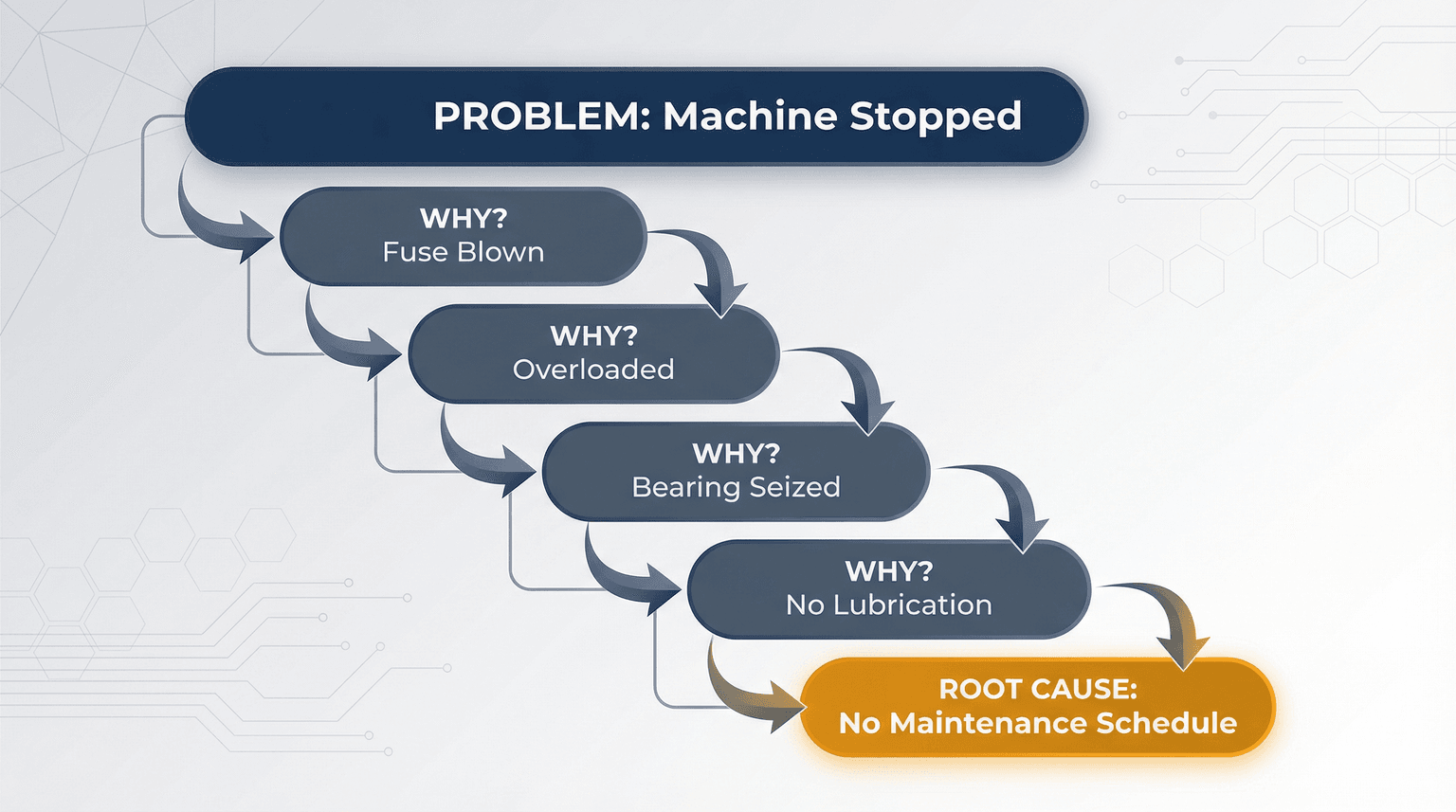
Beyond the basic framework, mastering advanced root cause analysis techniques separates good troubleshooters from great ones.
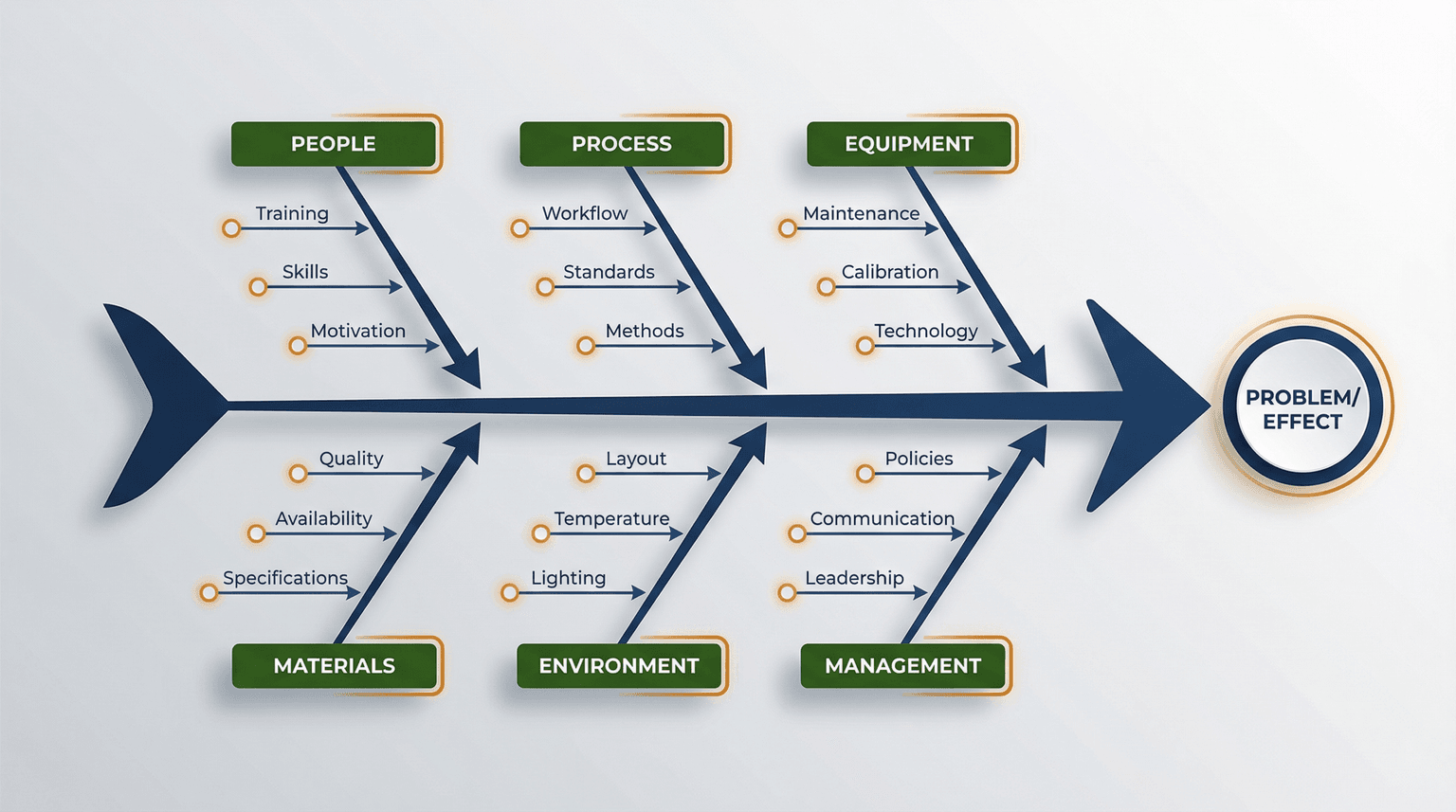
Fishbone (Ishikawa) Diagram
This visual tool categorizes potential causes into major categories:
- People: Training, experience, communication
- Process: Procedures, workflows, documentation
- Technology: Hardware, software, configurations
- Environment: Physical conditions, external factors
Fault Tree Analysis (FTA)
Used extensively in manufacturing and aerospace, FTA works backward from a failure to identify all possible contributing causes using Boolean logic gates.
Failure Mode and Effects Analysis (FMEA)
A proactive technique that identifies potential failure modes, their effects, and prioritizes based on severity, occurrence probability, and detectability.
Leveraging Diagnostic Tools Effectively
Modern troubleshooting relies heavily on diagnostic tools. According to Forrester Research, organizations using advanced diagnostic tools resolve incidents 47% faster than those relying on manual investigation.
Essential Tool Categories:
Monitoring and Observability Platforms
- Application Performance Monitoring (APM)
- Infrastructure monitoring
- Log aggregation and analysis
- Network traffic analysis
Diagnostic Utilities
- Built-in system diagnostic commands
- Vendor-specific diagnostic tools
- Third-party testing utilities
Collaboration Tools
- Screen sharing for remote troubleshooting
- Incident management platforms
- Knowledge management systems
The key to effective tool utilization is understanding data interpretation—simply running diagnostic tools is not enough; you must be able to analyze results accurately.
The Art of Asking the Right Questions
Experienced troubleshooters know that asking better questions leads to faster resolutions.
The SPIN Framework for Troubleshooting:
- Situation: What is the current state?
- Problem: What is not working as expected?
- Implication: What is the business impact?
- Need-payoff: What does success look like?
Effective Questioning Techniques:
- Open-ended questions to gather context
- Closed questions to confirm specific details
- Clarifying questions to ensure understanding
- Probing questions to dig deeper
Industry-Specific Troubleshooting: Real-World Examples

IT Support: Resolving a Critical Network Outage
Scenario: A regional bank experiences intermittent connectivity issues affecting 200 branch locations during business hours.
Problem Definition: Branch staff report that banking applications freeze randomly for 30-60 seconds, approximately 10-15 times per day, primarily between 9 AM and 4 PM.
Investigation Process:
- Data gathering: Network monitoring showed no obvious bandwidth constraints
- Pattern analysis: Issues correlated with specific transaction types
- Hypothesis: DNS resolution delays were causing timeouts
- Testing: Packet captures revealed DNS queries timing out intermittently
- Root cause: A recent security update changed DNS server priority, routing queries to an overloaded secondary server
Solution: Reconfigured DNS server priority and implemented DNS caching at branch routers.
Results:
- Resolution time: 6 hours (vs. 24+ hours typical for similar issues)
- Prevented estimated $180,000 in lost productivity
- Created documentation template for similar future incidents
Key Lesson: Correlating problem timing with system changes (the security update) was crucial to rapid resolution.
Manufacturing: Diagnosing Production Line Quality Issues
Scenario: An automotive parts manufacturer notices a 15% increase in defect rates for precision-machined components.
Problem Definition: CNC machining centers producing transmission gears are generating parts outside tolerance specifications, particularly affecting surface finish quality.
Investigation Process:
- Statistical analysis: Control charts showed gradual drift rather than sudden change
- Environmental review: Temperature and humidity logs were within specifications
- Equipment inspection: Spindle vibration analysis revealed subtle anomalies
- Material testing: Raw material samples met specifications
- Root cause: Coolant concentration had drifted below optimal levels due to evaporation during unseasonably hot weather
Solution: Implemented automated coolant concentration monitoring and adjustment system.
Results:
- Defect rate returned to baseline within 48 hours
- Prevented $450,000 in potential warranty claims
- Established preventive monitoring protocol for seasonal variations
Key Lesson: Environmental factors that seem unrelated can significantly impact precision manufacturing processes.
Customer Service: Addressing Escalating Complaint Patterns
Scenario: An e-commerce company experiences a 40% increase in customer complaints about order delivery issues.
Problem Definition: Customers report receiving incorrect items, delayed shipments, and poor packaging quality, primarily for orders placed on weekends.
Investigation Process:
- Complaint categorization: Created detailed taxonomy of issue types
- Temporal analysis: Mapped complaints to order dates and fulfillment shifts
- Process observation: Conducted time-motion studies in fulfillment center
- Staff interviews: Gathered front-line insights
- Root cause: Weekend shift staffing reductions combined with new inventory management system created scanning errors and rushed packing
Solution: Adjusted weekend staffing levels and implemented additional quality checkpoints.
Results:
- Complaint rate decreased 52% within two weeks
- Customer satisfaction scores improved 18%
- Developed comprehensive SOP documentation for fulfillment processes
Key Lesson: Human factors and system changes often interact in unexpected ways—investigating both is essential.
Common Troubleshooting Mistakes and How to Avoid Them
The Seven Deadly Sins of Troubleshooting
Research from the Service Desk Institute identifies these common pitfalls that derail troubleshooting efforts:
1. Jumping to Conclusions Acting on assumptions before gathering sufficient evidence leads to wasted effort and missed root causes.
Prevention: Enforce a minimum information-gathering phase before solution implementation.
2. Failing to Document Poor documentation means repeating the same investigation when similar issues recur.
Prevention: Make documentation a required step in your troubleshooting workflow, using standardized templates.
3. Working in Isolation Complex problems often require diverse expertise that no single person possesses.
Prevention: Establish clear escalation paths and encourage collaborative troubleshooting.
4. Ignoring the Obvious Sometimes the simplest explanation is correct—overlooking basic checks wastes time.
Prevention: Create checklists for common first-line diagnostics.
5. Treating Symptoms Instead of Causes Quick fixes that address symptoms without resolving root causes lead to recurring problems.
Prevention: Always ask "why did this happen?" even after implementing a fix.
6. Skipping Verification Assuming a fix worked without confirming creates false confidence.
Prevention: Define specific success criteria before implementing solutions.
7. Not Learning from Experience Each troubleshooting incident is a learning opportunity that should inform future practices.
Prevention: Conduct brief retrospectives after major incidents.
Building a Troubleshooting Culture in Your Organization
Creating a Knowledge-Sharing Environment
Organizations that excel at troubleshooting share knowledge systematically rather than hoarding expertise.
Strategies for Knowledge Sharing:
1. Centralized Knowledge Base Maintain a searchable repository of troubleshooting guides, known issues, and solutions. AI-powered knowledge bases can surface relevant information automatically based on problem symptoms, and a well-maintained FAQ page deflects the most common issues before they ever become tickets.
2. Regular Knowledge Transfer Sessions Schedule periodic sessions where team members share recent troubleshooting experiences and lessons learned.
3. Mentorship Programs Pair experienced troubleshooters with newer team members to transfer tacit knowledge.
4. Incident Retrospectives After significant incidents, conduct blameless post-mortems focused on process improvement.
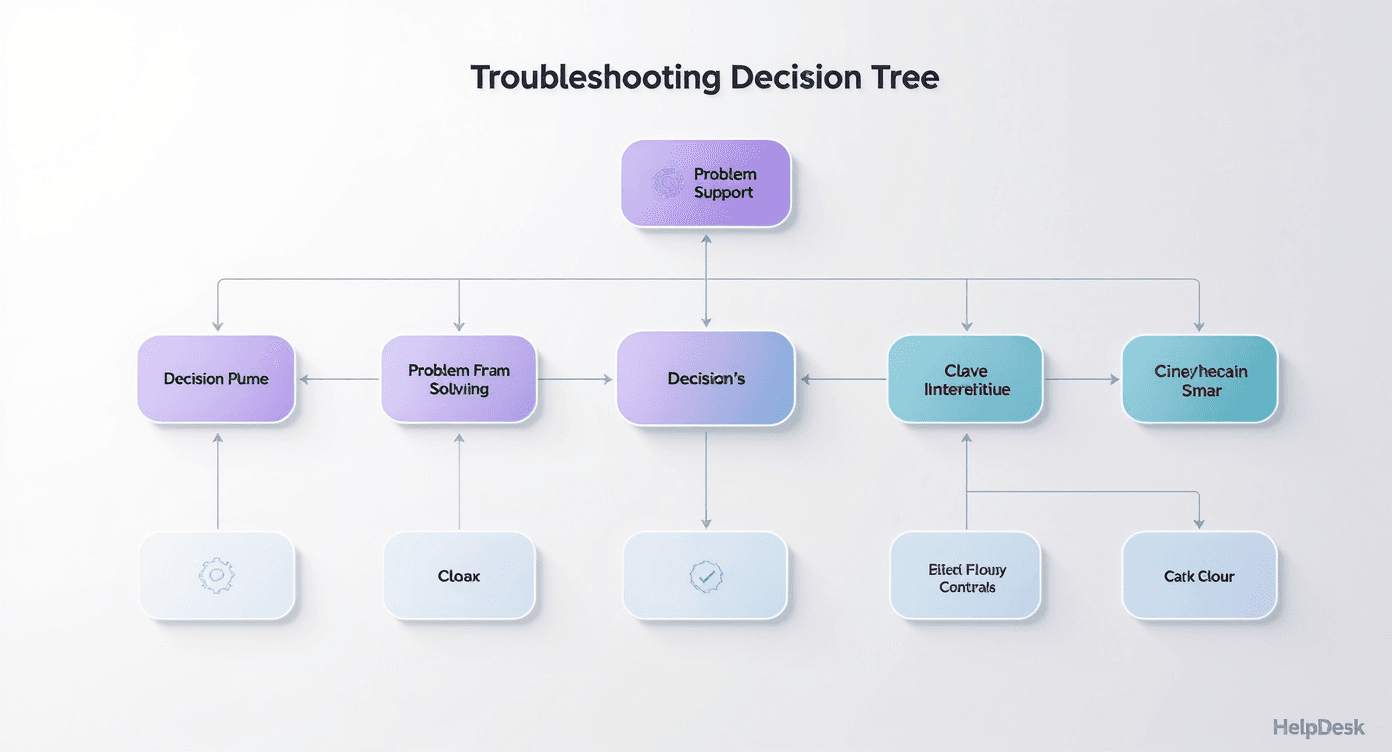
Continuous Improvement Through Feedback Loops
According to McKinsey research, organizations with mature continuous improvement practices outperform peers by 25% in operational efficiency.
Implementing Effective Feedback Loops:
- Measure what matters: Track metrics like MTTR, first-contact resolution, and customer satisfaction
- Analyze trends: Look for patterns in incident types and resolution approaches
- Test improvements: Pilot new troubleshooting methods on a small scale
- Scale successes: Roll out proven improvements across the organization
- Document changes: Update standard operating procedures to reflect best practices
Training and Skill Development
Investing in troubleshooting skills development pays dividends across the organization.
Effective Training Approaches:
- Simulation exercises: Create realistic scenarios for hands-on practice
- Case study analysis: Review historical incidents to develop pattern recognition
- Cross-training: Expose staff to adjacent domains to broaden perspective
- Certification programs: Formal credentials like ITIL, Six Sigma, or vendor certifications
- Continuous learning: Regular updates on new technologies and methodologies
Tools and Technologies for Modern Troubleshooting
AI and Machine Learning in Troubleshooting
Artificial intelligence is transforming troubleshooting capabilities. According to IDC, AI-assisted troubleshooting tools will be used by 65% of enterprise IT organizations by 2026.
AI Applications in Troubleshooting:
- Anomaly detection: Automatically identify unusual patterns that may indicate problems
- Predictive analytics: Forecast issues before they impact users
- Natural language processing: Allow users to describe problems conversationally
- Automated diagnosis: Suggest probable causes based on symptom analysis
- Knowledge recommendation: Surface relevant documentation automatically
Building an Effective Technology Stack
Essential Components:
- Monitoring and alerting: Proactive notification of potential issues
- Log management: Centralized collection and analysis of system logs
- Incident management: Tracking and coordinating troubleshooting efforts
- Knowledge management: Storing and retrieving troubleshooting documentation
- Collaboration tools: Enabling teamwork across locations and time zones
Platforms like Dewstack provide integrated knowledge base and documentation capabilities that support modern troubleshooting workflows.
Measuring Troubleshooting Effectiveness
Key Performance Indicators
Track these metrics to assess and improve troubleshooting performance:
Speed Metrics:
- Mean Time to Detect (MTTD): How quickly are problems identified?
- Mean Time to Resolution (MTTR): How long does it take to fix issues?
- First Contact Resolution Rate: What percentage of issues are resolved immediately?
Quality Metrics:
- Repeat Incident Rate: How often do the same problems recur?
- Escalation Rate: What percentage of issues require higher-tier support?
- Customer Satisfaction (CSAT): How do customers rate the support experience?
Efficiency Metrics:
- Cost per Incident: What resources are consumed per troubleshooting episode?
- Knowledge Base Utilization: How often is documentation consulted and helpful?
- Self-Service Resolution Rate: What percentage of issues are resolved without human intervention?
Benchmarking and Continuous Improvement
Compare your performance against industry benchmarks to identify improvement opportunities:
| Metric | Industry Average | Top Performers |
|---|---|---|
| MTTR | 4.2 hours | 1.5 hours |
| First Contact Resolution | 74% | 91% |
| Customer Satisfaction | 72% | 89% |
| Repeat Incident Rate | 18% | 6% |
Source: HDI Support Center Practices & Salary Report, 2024
Conclusion: The Path to Troubleshooting Excellence
Mastering troubleshooting is a journey that combines systematic methodology, technical expertise, and continuous learning. The organizations and individuals who excel at troubleshooting share common characteristics:
- They follow structured frameworks rather than relying on intuition alone
- They invest in documentation and knowledge sharing
- They embrace technology as an enabler, not a replacement for human judgment
- They learn from every incident and continuously improve their processes
As technology becomes more complex and business expectations continue to rise, effective troubleshooting skills will only become more valuable. By implementing the frameworks, techniques, and best practices outlined in this guide, you can transform troubleshooting from a reactive burden into a strategic capability that drives business success.
Remember: every problem you solve is an opportunity to learn, improve, and build the foundation for faster resolution of future challenges. Start applying these principles today, and you will be well on your way to troubleshooting mastery.
Build Better Troubleshooting Guides with Dewstack
Great troubleshooting documentation can be the difference between frustrated users and loyal customers. Dewstack gives you the platform to create troubleshooting guides that actually solve problems.
Document solutions in real-time: Dewstack's browser extension lets your support and engineering teams capture troubleshooting steps as they solve issues—complete with screenshots, annotations, and decision trees. Build guides from real solutions, not theoretical procedures.
AI-powered problem resolution: SmartDocs understands your troubleshooting content and delivers contextual answers to user questions. Users describe their problem in natural language and get step-by-step guidance instantly—no more searching through endless articles.
Centralize your troubleshooting knowledge: Import existing guides from Confluence, Word, or scattered support tickets into one organized, searchable hub. Version control ensures users always access the latest solutions.
Data-driven improvement: Analytics reveal which issues users search for most, where they get stuck, and which guides successfully resolve problems. Continuously refine your troubleshooting content based on real user behavior. Custom domains and branding create a seamless support experience.
Ready to transform your troubleshooting documentation? Try Dewstack for free and build an intelligent problem-solving ecosystem that empowers users and scales expertise across your entire organization. See pricing for plan details.
Ready to Elevate Your Documentation?
Try Dewstack free for 7 days. Create AI-powered documentation that answers questions instantly.
Start a free trialANSWERS TO
Frequently Asked Questions
Here are some common questions that might provide the information you're seeking.
Related Blogs
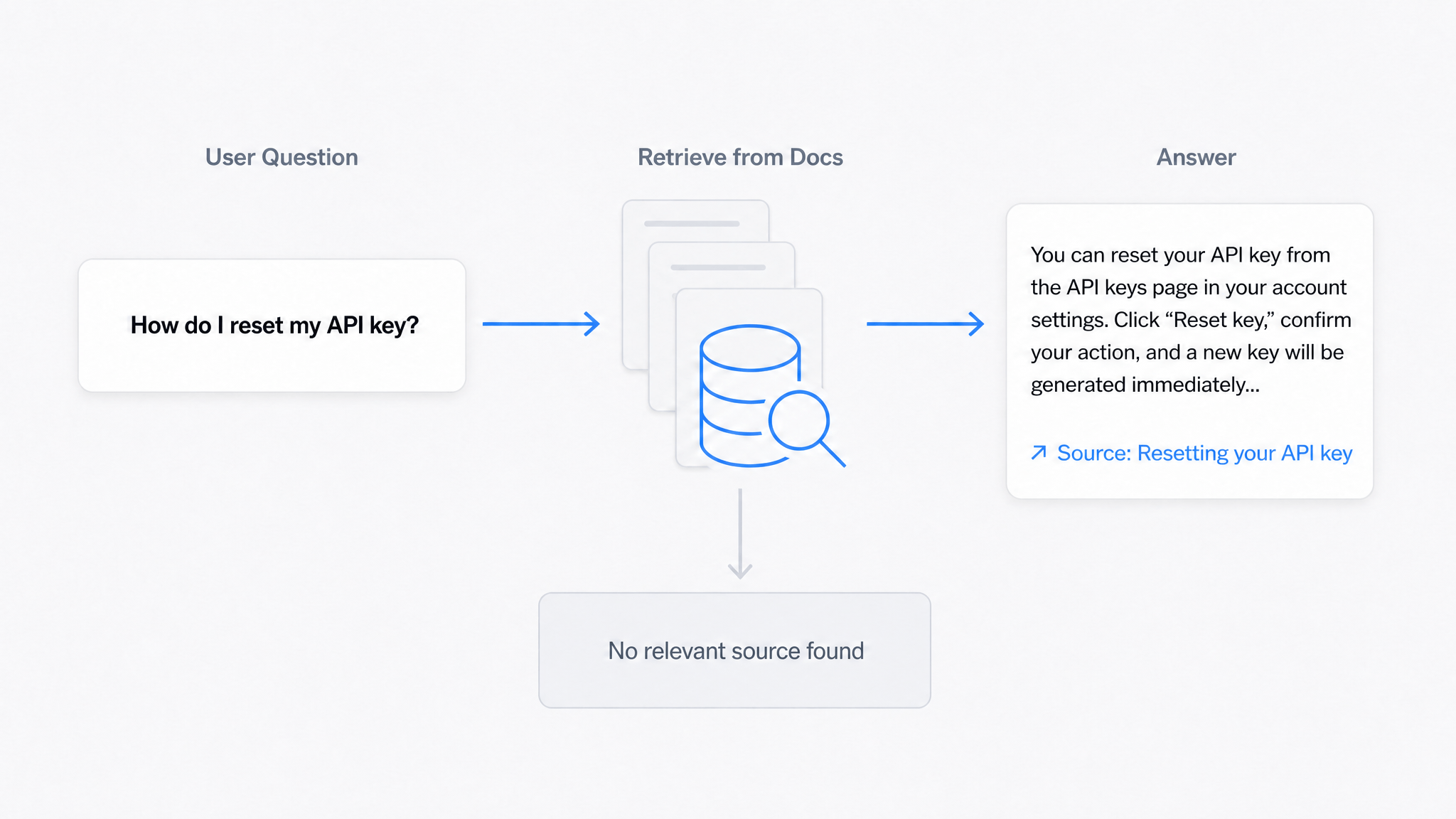
AI Answers From Your Docs: Grounded Answers, Citations & Hallucination Control
How an AI chatbot for technical documentation gives grounded answers with source citations, controls hallucinations, and turns unanswered questions into drafted pages.
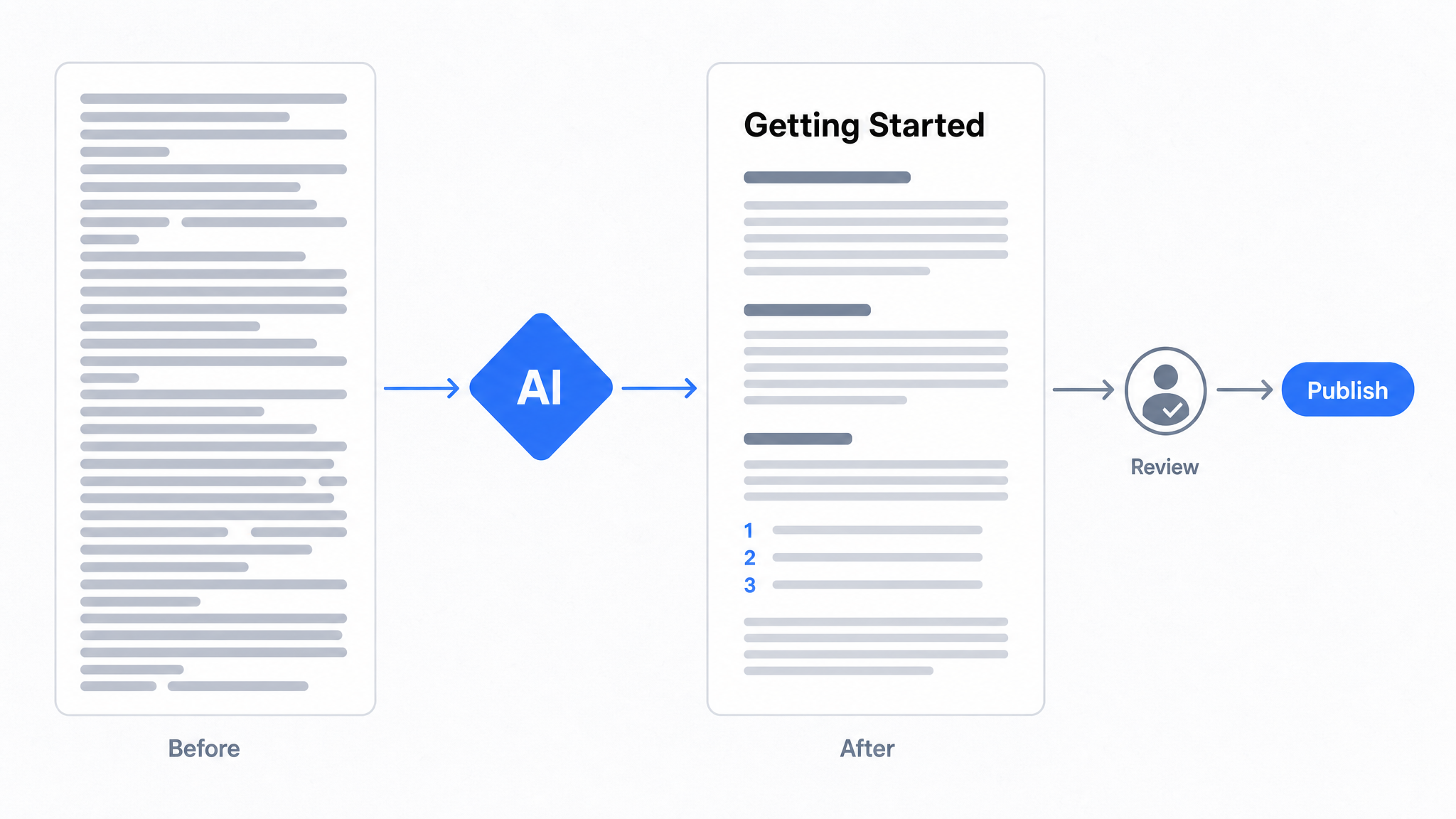
How to Use AI to Improve Existing Documentation
Use AI to audit, rewrite, and translate the documentation you already have, and let a connected agent draft improvements to stale pages for a human to publish.
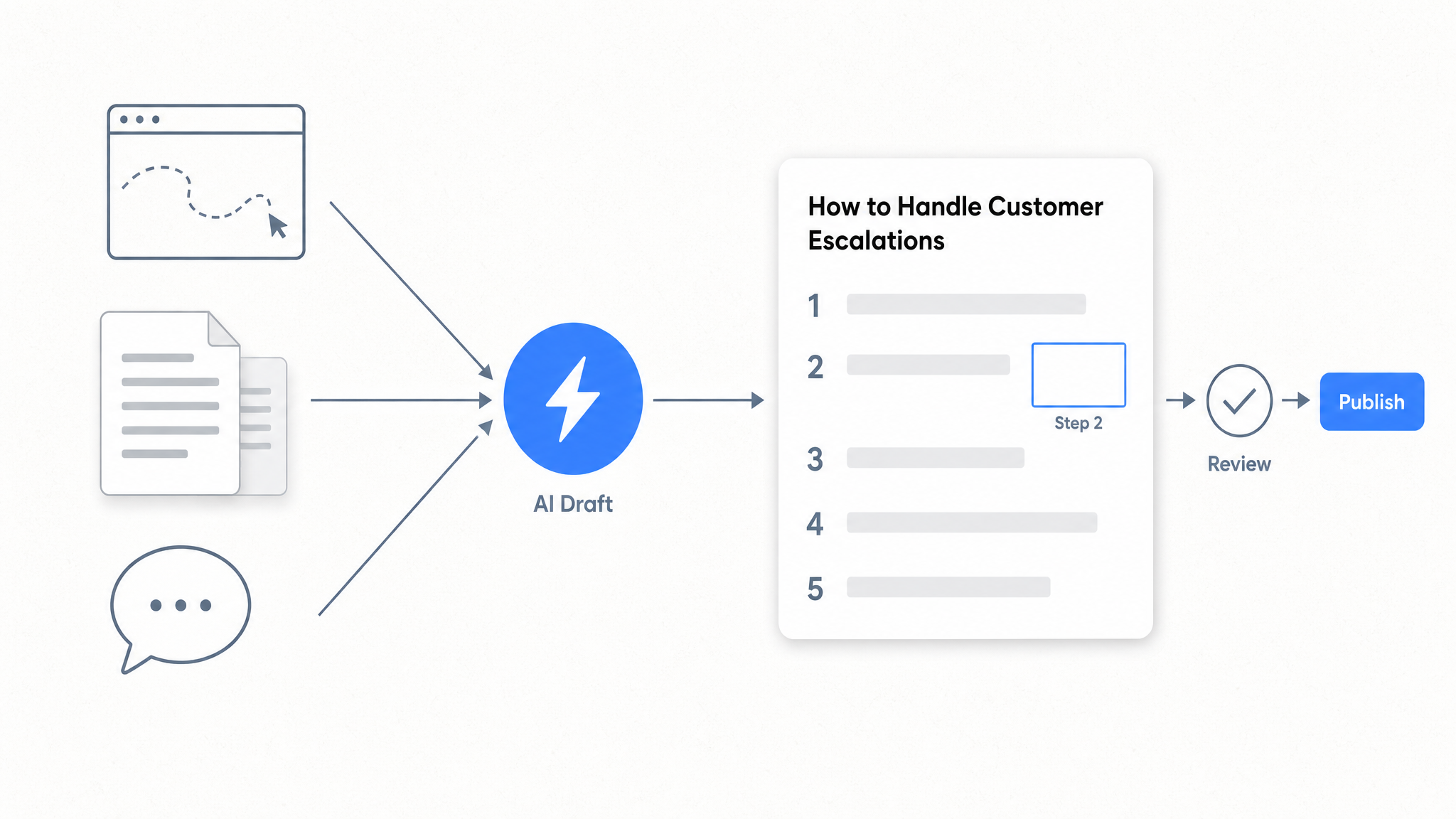
How to Automate SOP Creation with AI
Capture a workflow, let AI draft the SOP, review it, and publish it to a searchable knowledge base your team can query around the clock.
Ready to get started with Dewstack?
Try Dewstack free for 7 days. Create AI-powered documentation that answers questions instantly.
No credit card required.